Wednesday, December 13, 2006

Final Questionnaire Results

After taking New Media Technology 2020...
(all answers are out of 10)

1. How would you rate your knowledge of the internet? 8.6

2. How would you rate your knowledge of Adobe Photoshop? 8.0

3. How would you rate your knowledge of Dreamweaver? 7.4

4. Has your understanding of the web design improved? 8.5

5. How would you rate your knowledge of Adobe Premiere? 7.3

6. Has your understanding of video editing improved? 7.4

7. Has your understanding of the creative process improved? 7.9

8. Did you find the course load heavy, just right or light? 6.2
(just right)


9. Do you think enough instruction was given in:

Photoshop? 8.3

Dreamweaver/Web Design? 7.7

Premiere/Video Editing? 6.7

Art and Design Principles? 8.0

Friday, December 08, 2006

Video Gallery

Irfahan Kassam


Nathan House


Davin Johnson


Robyn Jenkins


Tamara Craft


Craig Pirie


Ryan Thai


Andrew Chen


Steven Mathers


Cody Scheibner


Randy Chua


Ryan Ozar


Melissa Steele


Brendan Coffey


Jeremy Chilton


Jeremy Koot


Ryan Fukala

Monday, December 04, 2006

Art News: Banksy Christmas


Santa's Ghetto is a "squat art concept store" which began five years ago and opens in a different location each holiday season. It features 20 underground artists under the wing of pop art graffiti prankster Banksy. The keyword at this exhibition is "affordable", however, that does not apply to Banksy himself, whose work is surging in popularity. Banksy exhibited four works at Santa's Ghetto which were reportedly purchased within ten minutes of the show's opening. One of the works, which features Michael Jackson luring an unsuspecting Hansel and Gretel to his gingerbread house with a candy cane, reportedly went for £100,000.

Other works on display include "Downing Street" by Peter Kennard which features Tony Blair snapping photos of a Mideast explosion on his cameraphone.


The Daily Mail has a few more details on what's in store: "Other artworks include two portraits of Mona Lisa by Nick Walker, in which Leonardo Da Vinci's iconic subject is mocked up as Marge Simpson. Also up for sale is a picture of Saddam Hussein in an American military uniform."


Banksy quipped of the show: "I felt the spirit of Christmas was being lost - it was being increasingly uncommercialised and more and more to do with religion. So we decided to open our own shop and sell pointless stuff you didn't need."

This year's exhibition is on Oxford Street adjacent to the Tottenham Court Tube station until Christmas.

Source: Towleroad


Link: Daily Mail

Friday, December 01, 2006

Adding scrolling titles to your project

Create a title page for your video name or for credits.

From the top line menu, File > New > Title Select the rolling title tool (it looks like a capital T surrounded by arrows pointing up, down, left and right) and create a text area on your page. Drag an area from the edge of the page to the end of the page.

Create a title page as you would create a page with any paint program or word processor.

Click on Title > Rolling Title Options and select whether you want the title to scroll up, down, left or right on your screen.

Click “OK.”

Place the title on the timeline by clicking and dragging it to the location where you want it to appear.

Change the duration of the title’s appearance by dragging the start or end of the clip to the right or left.

Render your work. Click Timeline > Render Work Area or press ENTER on your keyboard.

Source: Adobe Premiere 6.0
Exporting Premiere Files For Web

When exporting your Premiere files to a recognized video extension, you need to first start up EZ Cleaner, which is in your Class Software > Adobe > Premiere > and EZ Cleaner. The program needs to be simply started first, in order for Premiere to find it.

There are many file formats available - I recommend Windows Media Video or mpeg. One caution - your final file size must be less than 100 MB, otherwise YouTube will not accept the file when you upload the file.

Go to FILE > Export Timeline > Save For Web > Windows Media Video and select ISDN connection. A dialogue box will appear asking you to select where you want to save your .wmv file. Select the "S" drive and your personal folder.

Friday, November 24, 2006

How to download videos from YouTube


Click here for information on the VideoDownloader.

Download videos from Youtube, Google, Metacafe, iFilm, Dailymotion... and other 60+ video sites ! And all embedded objects on a webpage (movies, mp3s, flash, quicktime, etc)! Directly!

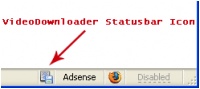
VideoDownloader adds a small icon on the status bar at the bottom of your Firefox window, and a toolbar button. Just click that and download the video you are watching !


Once the file is downloaded (as an "flv" file - otherwise known as "flash video" file) you must rename the file to "nameofvideo.flv. Then you must convert it to an "mpg" in order to use it in Premiere. To do this, you have to download another program called...

Free Riva FLV Encoder 2.0
Transcode your existing Flash Video (FLV) format files with Riva FLV Encoder. Click here to visit the web site where you can download it.

Once you've selected your INPUT Video, you simply change the name of the the OUTPUT Destination Video File extension to "mpg." Then click the Encode button. It'll take a few minutes, but the mpg video will appear (wherever you saved it).
Smaller Video Size and Determining Video Size of Found Video Clips

Q. When downloading clips from the internet, what size is appropriate to use for our video editing project? And how do we find out what size the video is that we've downloaded?

A. 320 x 240 is the standard size for smaller videos. This is the size of the stock videos we have. I've been using some of these in my larger format, and they look okay, but I've been using them mostly as background transparencies.

If you are looking at a quicktime movie, for example, you can open up the video, then go to the WINDOW pulldown menu, and select SHOW MOVIE INFO. The size is listed near the bottom of the list.

Unfortunately I don't see this option in Windows Media - I would first of all change any .wmv into .mpg, simply by changing the file extension name (not putting it through a conversion program, just change the last three letters of the file name), then open it in Premiere and go to the CLIP pull down menu, and select PROPERTIES. You can also open mpgs in Premiere and do the same to find out the size of the video.