Welcome to the age of New Media: an era where art and technology combine to create instant, interactive, mass communication. Are you ready?
Friday, November 24, 2006
How to download videos from YouTube
Click here for information on the VideoDownloader.
Download videos from Youtube, Google, Metacafe, iFilm, Dailymotion... and other 60+ video sites ! And all embedded objects on a webpage (movies, mp3s, flash, quicktime, etc)! Directly!
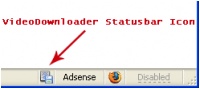
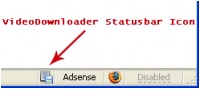
VideoDownloader adds a small icon on the status bar at the bottom of your Firefox window, and a toolbar button. Just click that and download the video you are watching !
Once the file is downloaded (as an "flv" file - otherwise known as "flash video" file) you must rename the file to "nameofvideo.flv. Then you must convert it to an "mpg" in order to use it in Premiere. To do this, you have to download another program called...
Free Riva FLV Encoder 2.0 Transcode your existing Flash Video (FLV) format files with Riva FLV Encoder. Click here to visit the web site where you can download it.
Once you've selected your INPUT Video, you simply change the name of the the OUTPUT Destination Video File extension to "mpg." Then click the Encode button. It'll take a few minutes, but the mpg video will appear (wherever you saved it).
Smaller Video Size and Determining Video Size of Found Video Clips
Q. When downloading clips from the internet, what size is appropriate to use for our video editing project? And how do we find out what size the video is that we've downloaded?
A. 320 x 240 is the standard size for smaller videos. This is the size of the stock videos we have. I've been using some of these in my larger format, and they look okay, but I've been using them mostly as background transparencies.
If you are looking at a quicktime movie, for example, you can open up the video, then go to the WINDOW pulldown menu, and select SHOW MOVIE INFO. The size is listed near the bottom of the list.
Unfortunately I don't see this option in Windows Media - I would first of all change any .wmv into .mpg, simply by changing the file extension name (not putting it through a conversion program, just change the last three letters of the file name), then open it in Premiere and go to the CLIP pull down menu, and select PROPERTIES. You can also open mpgs in Premiere and do the same to find out the size of the video.
Over the years of working with writers and copywriters, and studying works of art, I picked up some insights on how to write an artful narrative. If you have decided to work with a narrative: written, spoken or just using images; consider some of these techniques.
The art of doublespeak During my graduate work at SFU, I was fascinated by the cultural, social, political and personal meaning of tattoos. I noted that the process of getting a tattoo involved pain, and after interviewing people about their experiences realized that the "pain" element was often part of the significance of the act for them. Tattoos are often relegated to the counter culture, and I made a connection between tattooing and sado-masochism. I wrote the following narrative, making it sound like an S&M experience, but it was actually about getting a tattoo. This photo panel (1 of 3) was about 4' wide by 12' tall, and hung with a metal chain and fastened in the gallery window.
By finding relationships between two normally unrelated concepts or things, you can build a metaphor by speaking about the one thing, but actually making hidden references to the other. The mixing up of the meaning of two different things should create a insights into both.
Another great example of "doublespeak" is the Enigma Video: Sadeness.
Sade-ness: not an Enigma Procedamus in pace
This song, and many of Enigma's songs are about the conflict between the physical (body, sexuality, corporeal) and the spiritual (meaning of life, spiritual evolution, values and morals). This is immediately made clear in the music itself - the contrast between the ethereality of much of the spiritual/religious music such as Gregorian chants and others that are sampled, with grinding, techno, primitive and sexualized drums.
Enigma is not at all Christian in its theology - it offers absolutely no solutions, but only brings ideas into question. Enigma uses religious music from many different cultures including Christianity, Islam, Hindu and native peoples, etc. which suggests it is much more easily classified as New Age - a belief that all religions share common spiritual beliefs. New Age is said to have no true theology or discipline: it is based on personal exploration and is "situation-specific."
I see this song as clearly playing with (not coming to any conclusions about) the idea of sadism as a sexual/spiritual practice - it believes there is a spiritual release into Oneness, through the techniques of domination of submission through sexual practices that include pain and humiliation. Practitioners describe a religious ecstasy when certain thresholds are crossed.
The Marquis de Sade may be the writer who others later used as a historical figure in the term sadism or the practice and beliefs of sado-masochism, but contemporary sado-masochism is entirely different than what the Marquis described or practiced.
The Marquis de Sade is referred to as a representative of the practice of sado-masochism. In a sense, the questioner is conflicted between her Christian beliefs that sex, domination, submission, pain and humiliation are evil, while she herself is tempted by them, or perhaps has experienced them.
She asks: Sade, tell me Sade, give it to me ("give it to me" is a sexual reference) Let us come in peace (a play on the word "come") In the name of Christ, Amen (a teasing sacrilegious reference in this context).
Sado-masochism is a paradox, because it promotes a powerful pleasure to its practitioners, and a type of spiritual experience that feels "divine" while using techniques that are generally considered evil.
Ironically, some interpretations of Christianity, particularly as practiced the Medieval era, promoted submission and domination by the Catholic Church, including self-flagellation and the punishment of the body (the corporeal) to achieve the incorporeal (spiritual awakening).
Keep in mind that Michael and Sandra Cretu also live on the Spanish island of Ibiza, reknown for its wild, rave and party scene, and are highly involved in the dance club music industry.
Finally, in many of Enigma's works, there are explicit references to the celebration of the body and sexuality, and references to sado-masochism. In this video, there are clear visual to Romanticism and Neo-Gothic, both in terms of the architecture and visual style.
Procedamus in pace In nomine Christi, Amen Cum angelis et pueris, fideles inveniamur Attollite portas, principes, vestras, Et elevamini, portae aeternales, Et introibit Rex gloriae. Quis est iste Rex gloriae?
Sade, dis-moi... Sade, donnes-moi... Procedamus in pace In nomine Christi, Amen
Sade, dis-moi, qu'est-ce que tu vas chercher? Le bien par le mal? La vertue par le vice? Sade, dis-moi, pourquoi l'û?vangile du mal? Quelle est ta relûÙgû?on? Ou sont tes fidû´les? Si tu es contre Dieu, tu es contre l'homme Sade, es-tu diabolique, ou divin?
Let us come in peace In the name of Christ, Amen In the company of angels and children, we will find the believer Raise the poles of your glorious doors And once they are elevated, The Glorious King will arrive Who is this Glorious King?
Sade, tell me Sade, give it to me Let us come in peace In the name of Christ, Amen
Sade, tell me What are you looking for? The good or the bad Virtue or vice Sade, why the gospel of evil?
What is your religion and the religion of your followers? If you are against God, you are against man Sade, are you diabolic or divine?
Sade, say to me, Hosanna Sade, give to me, Hosanna Sade, say to me, Hosanna Sade, give to me, Hosanna
In the name of Christ, Amen Author's note: Please don't make the assumption that I am into sado-masochism: I'm only interpreting the video.
The Art of Description and the Avoidance of Sentimentality
When writing an artful narrative in a North American, Eurocentric culture, such as ours, it's considered essential to avoid "sentimentality."
Definition: The quality or state of being sentimental especially to excess or in affectation. Marked or governed by feeling, sensibility, or emotional idealism. Resulting from feeling rather than reason or thought [a sentimental attachment] [a sentimental favorite]. Having an excess of sentiment or sensibility.
Writers recommend describing an event or a situation, from as objective a viewpoint as possible, avoiding excesses of feeling words. Allow the reader to interpret the character's emotions through his or her actions, rather than telling the viewer what he or she is feeling. By doing this, you will employ symbols and metaphors that suggest a specific act is revealing something about the character's true emotional state. Often used examples are the "excessive washing of hands" or "spilled coffee."
Here is a quote from a good essay I recommend reading on narrative. Click here to view the full article.
"A narrative is a moving picture. Like description, narratives need to have a rich texture of details so that the reader is seeing, hearing, smelling, and touching. The reader should experience the story, not simply hear it.
Stories add the element of time to description. Often stories start at the beginning and then follow the sequence of events chronologically. However, an effective variation on this pattern is to start in the middle of things and then use flashbacks to fill in the background information. This method is especailly effective in holding the reader's attention.
There are two extremes you want to avoid in writing a narrative. First, you can simply tell the story, event by event, without giving it any texture because you leave out descriptive details and dialogue. At the opposite extreme is a narrative that attempts to tell everything, painting detailed descriptions of every scene, quoting everything that is said, even speculating about the thoughts of the characters. A good narrative has texture, but it is suggestive rather than exhaustive. After all, the reader's imagination needs some room to fill in details. Giving too many details not only overwhelms the reader's imagination, it also slows the pace of the narrative.
Pacing is an important concept in narrative writing. Basically, pacing means that the writer sometimes slows the pace by putting more detail in, but sometimes she also hurries over details. A good way to know where to put in details and where to leave them out is to think of a narrative as consisting of episodes (smaller scenes that are strung together to make up a longer story). If you divide your story into a few short episodes, then you want suggestive detail within the episodes, but you want to hurry over the transitions between them. Think of episodes as pearls on a string. Make the pearls full orbed; keep the string stringy. The reader dwells in the episodes, but she needs to be oriented to them, and that is the function of the transitions."
How to Write a Narrative Essay by Jesse Seldess, Professional Writer
Click here to learn how to write a narrative essay with these easy-to-follow tips. Mutilation by Patrick Roscoe Patrick Roscoe is an award-winning fiction writer who's dense narratives are filled with powerful and often disturbing imagery.
"Flies grow drowsy and drunk in Tanzanian sun, bumble against the mesh-screened window, burst with the promise of blood. Beside the sill, a small boy kneels on the floor of red tiles polished once a week by the silent houseboy; a scent of wax lingers like an eternal reprimand in the air. With a pin pinched between thumb and finger, the child contemplates the flies, discerns which is the fattest or biggest or most lazy. His left hand holds the chosen one in place and his right hand guides the pin into its body. Time holds its breath while the insect's thin hard encasing is being penetrated, then exhales in relief as the silver sliver eases into inner softness. The wings of the fly beat and buzz as red liquid drools upon the window ledge, glues its body there. With one finger, the boy paints lines and shapes upon his blank anonymous arm. He can draw numbers, letters of the alphabet, or more elusive symbols. Recently, he has learned to spell his name."
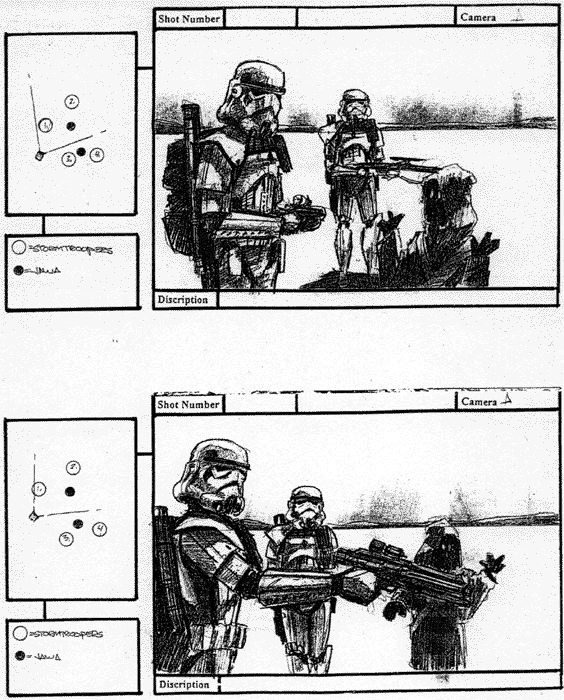
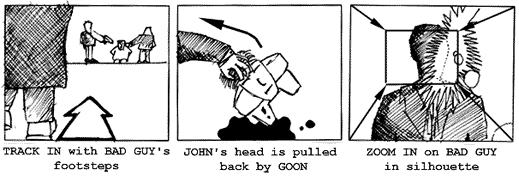
Sample storyboards from 'Troops' - an excellent short film set in the Star Wars universe by Kevin Rubio & Co. Art Director - Eric Hilleary.
Storyboarding is the process of producing sketches of the shots of your script. The end result looks like comic book of your film (without the speech bubbles).
Why do it?
It helps you think about how your film is going to look. You can work faster on set and as pictures communicate better than words it will allow your camera crew to move their camera and lights, for producers to foresee problems, for the art department to know which parts of the location are going to be in shot and so on. Even the actors will get a feel of what they are going to be shooting!
So I need to be an artist?
Well you can be, but looking at storyboards by Hitchcock or Spielberg you have to admit that they can't draw. There are professional storyboard artists that can give you results that look better than the final film. However its a good idea to bash them out yourself, it allows you to experiment quickly and cheaply, testing out different versions of how a scene may look and play on camera.
Storyboarding is especially useful for complex visual sequences e.g. elaborate shots or special effects sequences. Sometimes a film only uses storyboards for difficult sequences other times the entire film is storyboarded. The Coen Brothers (Fargo, The Big Lebowski) storyboard extensively, allowing them to shoot just the sequences they require for editing, saving both time and money.
Hang on though, pictures are still, movies move.
Ah! You got me there. There are a few tricks storyboard artists have up their sleeves to illustrate movement - whether its movement within the frame (actors walking) or the frame moving itself (camera panning etc.).
Arrows - Suppose the camera is tracking in, following a bad guy's footsteps. Draw in an arrow pointing into shot to show the camera's movement. Now the hero's head is pulled back by one of the bad guy's goons. Use an arrow to show the movement of the head being turned. What about a zoom in? From each corner draw in arrows pointing to the centre, draw in a new smaller frame to show the end of the zoom. Generally I try and use thick white arrows to show camera moves and thin black arrows to show objects moving.
The floating frame - What if you want to show the camera panning to show a cityscape, or following a character as they walk through an airport? There's two options here: 1) Illustrate one shot using more than one storyboard frame showing the key stages of the shot's movement across a number of frames or 2) Draw out the entire scene (e.g.. the horizon of a city) and place a frame on it with an arrow indicating the direction of movement.
Transitions - The storyboard can also include transitions in your film. Write these in the gaps between the frames e.g.. DISSOLVE TO :
Editing is one of the most creative aspects of filmmaking. The film editor, in conjunction with the director, establishes the pace and structure of a film by connecting various shots to create scenes and sequences that form the final movie. The shots the editor chooses and the ways they are combined set the mood, develop the action, create the rhythm, establish the film's time and space, and guide the viewers' attention. For a typical feature-length film, the editor begins with hundreds of thousands of feet of film and must reduce it to less than 10,000 feet.
In the 1920s, Russian filmmaker Lev Kuleshov conducted a series of experiments designed to demonstrate that when two separate shots are projected in succession, the viewer assumes a connection between them. In one experiment, Kuleshov spliced together a series of shots that had been taken in different places and at different times. The shots were of a waiting man, a walking woman, a gate, a staircase and a mansion. Kuleshov's viewers—who interpreted the sequence as a man and a woman meeting at the gate in front of the mansion—had, in essence, inferred a whole narrative on the basis of seeing only portions of it. This effect allows filmmakers to use exteriors and interiors miles apart and imply that they are in the same place, to have people filmed on different days appear to be talking to each other, to have actors seemingly facing dangerous situations, or to imply that what actors are thinking about is represented by a subsequent cutaway image.
The Kuleshov effect is an editing technique that illustrates how the human brain tries to find connections between objects when viewed together. Other editing techniques rely on how the human eye works. For example, there usually must be an appropriate change in distance for a shot not to seem like a mistake or "jump" cut. The direction in which things move across the screen is also an editorial concern. A car that exits the screen on the right is expected in a subsequent shot to reappear on the left—otherwise the car could be perceived as a different car coming from the opposite direction. Scenes featuring characters in opposition to each other (a hero and villain, for example) usually feature one character continually facing one direction with the other character continually facing the other direction. This keeps the two "sides" clear.
Storyboarding
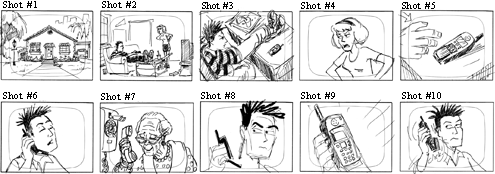
Here is an example of a shot list for the comic strip illustrated below.
1. LS - Exterior of house. Day. 2. LS - Mom to boy. Boy facing right, Mom facing left. "You should call your Grandma." 3. MS - Overhead. Boy staring at phone facing right. Phone on right side of screen. 4. CU - Mom's face. Mom facing left. "You should call your Grandma." 5. ECU - Boy picking up phone. Hand enters from left side of screen. 6. CU - Boy on phone. Phone on left side of screen. Boy's right ear. "Hello, Grandma." 7. CU - Grandma on phone. Grandma facing left. "Why don't you call more often?" 8. CU - Boy staring at phone. Phone on left side of screen. 9. ECU - Phone. Boy's hand on left side. 10. CU - Boy hanging up phone. Phone on left side of screen. Boy looking at phone.
What happens if, instead of the current sequence, the panels are placed in a different order?
Example #1—1, 7, 6, 9, 10, 2 ,3, 4, 5, 8 (Grandma has called the boy from her house and, after hanging up, the boy is told to call his Grandma by his Mom.) Example #2—5, 8,1, 7, 6, 9, 10, 2, 3, 4 (The boy calls Grandma, she admonishes him, the Mom says to call Grandma, and after he doesn't respond, reminds him again.)
Example #3—1, 3, 7, 5, 6, 9,10, 2, 4, 8 (The boy thinks about calling his Grandma, imagines what she would say, calls her, hangs up, and is told to call her by the Mom.)
Montage
Film editing can have its own unique logic as well, functioning in much the same manner as the brain with seemingly jumbled thoughts and images creating their own individual meaning. The groundwork for many of these techniques, later used by Alfred Hitchcock and others, was laid by a group of Soviet filmmakers—most notably Lev Kuleshov, Sergei Eisenstein and Vsevolod Pudovkin—who, in the early 1920s, began to experiment with film style and technique and especially with montage.
Montage, or collision editing, is done by splicing together a rapid sequence of carefully selected shots to evoke a specific emotional or intellectual response. The Russians' premise was that each shot derived meaning from the context in which it was placed. If the context changed, the meaning of the shot and the sequence also changed.
Montage, in the modern sense of the word, often refers to sequences where several shots have been edited together to compress a series of events that happen over time (e.g., sequences of young couples falling in love, scenes with flying calendar pages, etc.). Psycho
In Psycho, Alfred Hitchcock's famous shower scene uses a rapid series of extreme close-ups to build suspense and heighten the sense of panic. Many viewers believe they have seen a very brutal stabbing, even though the knife is never shown piercing the body of the victim.
Potemikin
This sequence in Sergei Eisenstein's 'Potemkin', one of the most famous in film history, recounts the brutal suppression of Russian workers and sympathizers following the death of proto-revolutionary figure Vakulinchuk onboard the Potemkin. Crewmen on the ship had mutinied due to oppressive working conditions and when they arrive at Odessa townspeople came to pay respects for Vakulinchuk and support the workers ... the film itself is based upon the failed 1905 Russian Revolution ... the Odessa sequence is a frightening precursor of government suppression of dissent throughout the 2Oth century, including, but certainly not limited, to Hungary (1956), Czechoslovakia (1968), Soweto (1976), Tiananmen Square (1989) - even Kent State (1970).
The Odessa Steps sequence in Eisenstein's The Battleship Potemkin, is the classic example of montage. If possible, show this to your students. In this sequence, the Czar's army is quashing an uprising. Eisenstein uses editing to show the fear of the people, their escalating panic, the tragedy of innocent bystanders as a baby in a carriage careens helplessly down the steps, and the intensifying threat of the soldiers, their guns and artillery.
Some of the terminology that a film editor uses includes:
Close-up (CU): A shot showing a detail only (ex., face only or hands only).
Cross-cutting: Cutting back and forth between two or more events or actions that are taking place at the same time but in different places. Cross-cutting is used to build suspense or to show how different pieces of the action are related.
Cut:An abrupt transition from one shot to another.
Cutaways: A cut away from the primary subject to something the filmmaker has decided is equally or more relevant at that time. Often cutaways consist of shots showing the reaction of one character to another. This is often used to compress time in what appears to be a seamless manner.
Dissolve: An overlapping transition between scenes where one image fades out as another fades in. Editors often use this to indicate a change in time and/or location.
Establishing Shot: A shot, usually taken from a distance, which establishes for the viewer where the action is to occur and the spatial relationship of the characters and their setting.
Extreme Close-Up(ECU): A detail of a close-up (eyes or mouth only, etc.).
Fade In: A shot that starts in darkness and gradually lightens to full exposure.
Fade Out: A shot that starts at full exposure and gradually fades to black.
Freeze-Frame: At a chosen point in a scene, a particular frame is printed repeatedly, given the effect of halting or "freezing" the action.
Jump Cut: A cut where two spliced shots do not match in terms of time or place. A jump cut gives the effect that the camera is literally jumping around.
Long Shot (LS): A shot taken at a considerable distance from the subject. A long shot of a person is one in which the entire body is in frame.
Medium Shot (MS): A shot framing a subject at a medium range, usually a shot from the waist up.
Reverse cutting: A technique alternating over-the-shoulder shots showing different characters speaking. This is generally used in conversation scenes.
Sequence Shot: An entire scene or sequence that is one continuous camera shot. There is no editing.
The visual change from one clip to another is called a transition. To add nuance, texture, or special effects between video clips, Premiere provides a variety of transitions, such as wipes, zooms, and dissolves. The simplest transition is the cut, where the last frame of one clip leads directly into the first frame of the next. The term comes from film editing, where a cut means splicing two shots together. Very often, a cut is the most effective way to move from one scene to the next. Other transitions, however, are useful in setting a mood or adding a creative element to your project.
The transitions included with Premiere typically involve the end of one clip and the beginning of the next. For example, the Cross Dissolve transition might dissolve the last second of one clip into the first second of the next. Some transitions, such as Inset, can involve both clips in their entirety, depending on the desired effect. Using the Transitions palette
Premiere includes over 75 transitions, which you choose from the Transitions palette. Within the palette, transitions are organized by type, in folders. Each transition is represented by an icon depicting how it works, where A is the first clip and B is the second. To help you choose, you can animate these icons and view brief descriptions. In addition, you can preview the transition effect with actual frames from the two clips involved in the transition.
When creating a Transition, the two separate clips must overlap slightly. When working in A/B Format on the Timeline, one clip goes on Video 1A, and the overlapping clip goes on Video 1B, or vice versa. Then the Transition is dragged onto the Transition portion of the Timeline, and shortened or lengthened as needed.
To preview the Transition, hold down the ALT key on your keyboard, and drag the Timeline Slider over the transition to preview. Make adjustments until you are satisfied with the transition, then click on the Transition area on the Timeline to select it, and press RETURN on your keyboard. This RENDERS the Transition.
In video or film, transparency allows one clip to show through another, creating composites, transitions, or special effects. The opacity of a clip or portion of a clip determines its level of transparency. At 100% opacity, an image contains no transparency at all; at 0% opacity, the image is completely transparent, allowing other clips to show through. At other percentages, the image is partially transparent, allowing other underlying images to be visible at the same time. The brightness values of a clip's alpha channel, an additional grayscale or monochrome channel in an RGB image, also determine the clip's opacity.
Certain parts of clips can be made transparent using tools called keys. A key finds pixels in an image that match a specified color or brightness and makes those pixels transparent or semitransparent, depending on the type of key. This process is called keying, or keying out the color. Keys can also use a clip's alpha channel to create transparency.
You can create transparency in a clip only after you have placed it in a superimpose track. By default, each new project includes one superimpose track, called Video 2. You can add up to 97 superimpose tracks.
In addition to making portions of a clip transparent with keys, you can also adjust the opacity of the entire clip to fade it in or out. You can use fading to create additional transitional effects or to create simple superimposing.
When you place a clip in a superimpose track, an Opacity rubberband, appears beneath it (you must expand the superimpose track to display the Opacity rubberband). The Opacity rubberband specifies the opacity of the entire clip. By adding handles, you can adjust the opacity of a clip.
The Opacity rubberband adjusts opacity after any keys have been applied. In other words, moving the Opacity rubberband adjusts the opacity for opaque, transparent, and semitransparent regions in the clip.
To adjust fading:
1 Place a clip in a superimpose track. If necessary, click the triangle to the left of the track name to expand the track, or Option-click (Mac OS) or Alt-click (Windows) the triangle to expand all the superimpose tracks at once.
2 Click the red Display Opacity Rubberbands icon () to display the opacity rubberband.
3 With the selection tool selected, position the pointer over the top of the Opacity rubberband. The pointer changes to a pointing finger with red plus (+) and minus (-) signs.
4 Click to create a handle (a small red square), and drag the handle up or down to adjust the fading. The opacity percentage appears in the Info palette and updates as you drag a handle. Press the Shift key with a handle selected to view the opacity percentage and to change the percentage in 1% increments for finer gradations.
When the handle is at the top of the panel, the image is fully opaque; when the handle is at the bottom of the panel, the image is transparent. The line between two handles indicates the direction, length, and speed of the adjustment. The steeper the angle, the more sudden the change.
Clicking the Opacity rubberband to create an opacity handle (left) and dragging it to decrease opacity (right)
5 Repeat the above step to create as many handles as needed.
6 To delete a handle, drag it out of the superimpose track.
To create two opacity handles:
1 Select the fade scissors tool ().
2 Click the Opacity rubberband where no handles exist. Two adjacent handles appear.
3 Drag the new handles up or down to make a sharp increase or decrease in opacity.
To adjust the opacity of a specific segment:
1 Select the fade adjustment tool ().
2 Drag the line segment up or down. You can set the opacity of the entire clip to a constant value by adjusting the opacity rubberband in this manner before creating handles.
Special effects for film or video are often created by shooting a scene against a color screen. After the footage is digitized, the color screen is then made transparent with a key. The first scene, or clip, is placed over a second clip, which usually includes some sort of background scene. The result forms a composite, where the background is visible wherever the first clip is transparent, making the first clip appear to belong with the background.
Composites are often used in feature films where, for example, an actor appears to dangle from a helicopter or appears to be floating in outer space. In this case, the actor is shot in an appropriate position against a color screen, and after making the color transparent, the actor's scene is superimposed over the backdrop. Color screens are usually blue or green because these colors are relatively absent from skin or hair color.
When creating a new Adobe Premier Project, use DV - NTSC, Standard 32 kHz. The overall size of the frame is 720 x 480 pixels - keep this in mind when you're creating a static image in Photoshop. Use 72 ppi and RGB color model.
For some of the basic aspects of Adobe Premier 6, there are some excellent tutorial quicktime movies that you can view, for free, on the web. Take a look at these to help remind you of some of the functions that we'll be learning.
Introduction What's New in Premiere 6(03:13) Overview of Premiere(06:14)
Premiere's Interface The Project Window(06:58) The Monitor Window(06:42) The Timeline Window(05:10) Menus(16:35) Palettes(06:09) Setting Preferences(11:06)
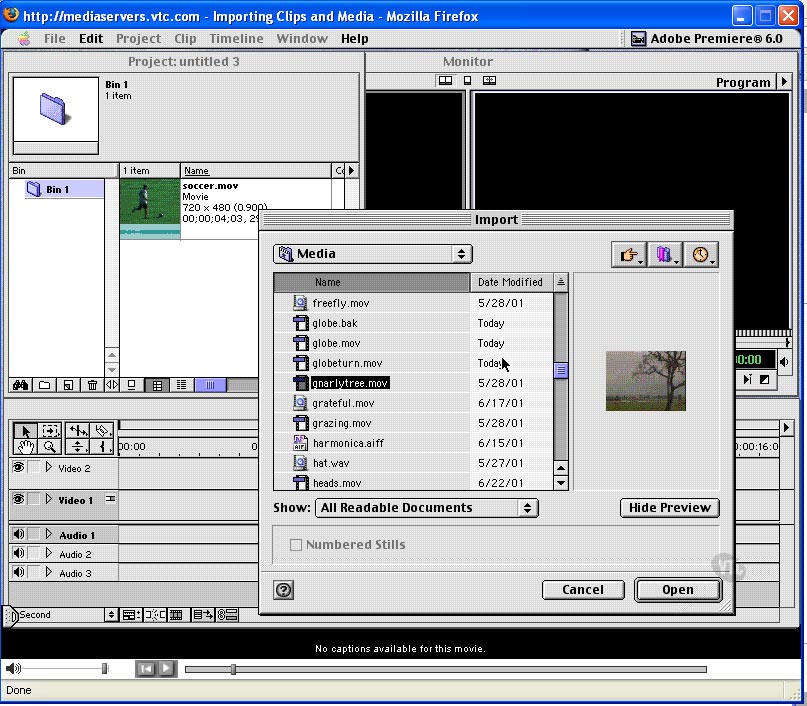
Media Acquisition Digital and Analog Compared(05:28) Capturing Digital Video(10:36) Capturing Analog Video(08:08) Batch Capture/Device Control(03:54) Capturing Time-Lapse Video(06:34) Capturing Audio(06:48) Working with Timecode(10:55) Importing Clips and Media(08:27) Saving Projects/Offline Files(05:46)
These two music videos were recommended by Brendan Coffey - there are some haunting and beautiful metaphorical images in each video, although I don't know how you can listen to the music without getting a migraine (ha ha).
I especially love the image of the beetle crawling across the book page, and it even looks like the video could have been filmed in Southern Alberta coulees! Other memorable images are: the woman in a wedding dress wandering through a wheat field; removing a book from the book cabinet and seeing the coulees through the empty space; the gesture of hands coming together; and much more.
Switchfoot "We Are One Tonight"
This video is mostly memorable for its transitions between scenes - they're very clever. I'm not certain it lives up to the requirements of "art," but certainly some of the visual techniques they employ in transitions could be employed in artistic endeavours. The video production techniques are artistic, but do they coincidence with meaning? Remember...production plus metaphor = meaning = art.
New Media News - Get a life and leave the real you at home in virtual online world www.secondlife.com
Click here to see an ABC News video on www.SecondLife.com Reyhan Harmanci, Chronicle Staff Writer Thursday, November 9, 2006
Dave Evans, a computer consultant in Boston who edits a blog about online dating, was hanging out in a strip club the other day when he noticed an extremely tall woman with horns and a tail standing next to him. He thought about asking her to take off her shirt -- hey, they were both in a strip club -- but thought the better of it.
"It turned out she was the brand manager of a multinational corporation," said Evans, 38. "Thank God I didn't ask her to take off her top! I bought her a beer and we did talk about doing business together."
Evans' confusion is understandable. The woman in question was not so much a woman as a digital representation of one, or an avatar. The beer he bought her was virtual. The strip club was in Second Life, the online 3-D interactive world built by San Francisco's Linden Lab, which currently boasts 1.2 million registered users.
How was Evans -- or anyone -- to know whom he was interacting with in this virtual world?
To nonusers, Second Life is a strange fad, the computer equivalent of hanging out in a masked ball. Although online personas are nothing new, role-playing sites such as Second Life are allowing for even more elaborate experimentations with fantasy and identity.
For some users, losing ties to real life is the whole point of Second Life. But for others, like Evans, who spends about an hour daily on Second Life, the site is "a huge social network," with possibilities for offline business deals or potential face-to-face meetings.
Catherine Smith, director of marketing at Linden Lab, said that Second Life's members wholly determine the workings of their virtual world, which leads to great socializing opportunities. The range of Second Life activities -- buying real estate, building homes, making clothes, creating body parts, taking classes, seeing a therapist, writing for a newspaper, getting married -- only broadens the scope of those relationships.
"What we found is that the social connections they make keep them returning," Smith said. "They come back for their friends, business partners, teachers, students, shopping partners, neighbors. ... There are many shared activities."
It's up to each user, then, to figure out who they are.
Maxine Montale, 42, a Second Life denizen who blogs about her Second Life experiences, said the relationship between real life and her "second life" has "varying levels." "In SL (Second Life), I am what I've always wanted to be: a sort of marketing/PR/designer. I dress up in business suits with my intelligent yet sexy black-framed glasses, walking around SL in stiletto heels," she wrote in an e-mail. In other ways, though, she remains essentially herself. "My behavior in SL, however, is the same in RL (Real Life). I am every bit the geek, spiritual and free-spirited person that I am in RL."
Some Second Life users crave stronger ties between the avatars and the people behind them. Michael Kasei, an owner of a virtual nightclub in Second Life, wrote on his profile that he is "not one to keep SL and RL separate."
He added: "If you're not shy about sharing details about yourself (not just your av) with your friends, I'd love to meet you!"
While many of the people Kasei has met don't want to talk about real life, he thinks that will change. "I think as the user base grows, and grows closer, you'll start seeing more real world interaction," he wrote in a Second Life chat session.
There.com, a similar site that is operated by Makena Technologies with a half million subscribers, aims for an even closer relationship between the virtual and the physical worlds. "Second Life can be difficult to get up and running," said Betsey Book, a Makena employee who used to edit the online journal Virtual World Review. "It's geared toward more technology proficient people, while we're much more geared to the mainstream."
"There.com was originally created for an audience in their late 20s, early 30s, but we've seen a lot of strong interest from younger users because of the social networking phenomenon," Book said. "Now they are getting interested in avatar-based spaces." Book said that two-thirds of There.com users are between 13-26, and the gender split is 50-50.
The avatars also have to look human on There.com. "I ask people that all the time, and they always say their avatars look as much like them as possible. People see their avatar as an extension of themselves," Book said, pausing for a moment before correcting herself. "An idealized version. A version of you that looks really fabulous."
But even on Second Life, people want to make themselves in their own image. Montale, for example, didn't stray too far from her real body. "I shopped around for an avatar shape and skin that would seem similar to my own RL shape and skin (with the exception of my SL breasts). I was disappointed to find that the Asian skins were indeed very Asian and since I never thought of myself as looking THAT Asian/Oriental," she wrote, after noting that she is Filipino, "I had to tweak the Asian shape and skin that I DID purchase to try to look like a true representation of myself in RL. Yeah, right!"
To help Second Life users meet each other, online social networking sites (a la MySpace) have been developed by users that let people create profiles for their avatars, and then interact, as avatars, when they aren't logged onto the immersive game.
"Second Life is simply a 3-D MySpace of tomorrow, so creating a customized Second Life profile site was simply a necessity," wrote Johan Mommens, 38, creator of one of Second Life's social networking sites. Mommens created SLProfiles.com in June, and it has 1,200 members. He said that although many of his members will discuss their "first life," others refuse.
"Although Second Life is a social network, it is different from other social networks since many people play a fantasy role within Second Life and try to keep their first life out of the picture," he wrote in an e-mail exchange. "I'm actually amazed to see how many guys like to play a girl within Second Life, which is very confusing for those who like to be 'serious' within Second Life."
Berkeley Professor Coye Cheshire, who studies the social ramifications of technology, said that Second Life and other interactive avatar sites are further exploiting the low costs of interacting online. "I think on a more philosophical level, there is evidence that people have always explored different roles and parts of their identities in different contexts," he wrote in an e-mail. "In the online context, I would say that the barriers to entering these environments have been 'greatly' reduced, and furthermore, that the costs of finding a relevant group are also quite small."
Right now, Second Life is wide open. People are building it from the ground up; as more people log on and more corporations, such as Pontiac, Sony and Nike, move in to promote their products, the terrain will change. It might look less like an escape from the real world and more like an extension of it.
Evans, for one, thinks that Second Life can do great things for dating.
"I want to get to the point where I could physically see the embodiment of my personality and interests," he said. "And then I could build my own date, build the woman of my dreams, ha! At first, you'd have all the guys making 18-year-old Britneys with big boobs, women making these supermen.
"But then, women could say, 'Do I match his avatar,' and vice versa. But it's too early now. It might take one more generation to get comfortable in 3-D."
New Media News - KFC's logo first to be seen from space
KFC has the honor to be the first brand to be visible from outer-space, according to company officials. The 87,500 square feet logo was created by tiles placed in the Nevada desert, near the super secret Area 51. The stunt marks the revamp of the KFC logo, which now features a more streamlined image of Colonel Sanders.
View the Google Video here of it being constructed and then viewed from space.
I've been watching brief bits of Much Music to study videos, and I've been surprised at how few good ones there are. Most of them are branding efforts: the music videos are sales tools focussed on creating an image for the artist, rather than focussing on the artistry of the music and meaning of the lyrics.
Here are a couple of videos that use metaphor to create meaning, and deepen the experience of the song. Obviously these are high production videos, so they're not something you'll be able to do. But I hope that you can see the difference between these and most music videos getting airplay these days. Notice the consistent visual direction and how the metaphors and symbols are related throughout.
These videos also reveal my own subjective musical tastes and creative direction, so keep this in mind. There are many ways to approach video and music in an artistic manner. If you have any suggestions, please send me an email and I'll put them up on our course blog.
Silence - Delerium (Featuring Sarah McLachlan)
What I love about this video is the remarkable simplicity of the concept - a man and woman running with their wrists chained together. But the moving image can be interpreted as a metaphorical narrative, about the challenges and difficulties of interpersonal relationships.
Enigma Enigma has many fantastic videos: here's just a few. Composer Michael Cretu is brilliant at mixing musical instruments and visual metaphors, to create a densely meaningful work of art.
Enigma - Sadness
Enigma - Push the Limits
Original version
Mixed version
Enigma - Beyond the Invisible
Age of Loneliness (Carly's Song)
Enigma - Mea Culpa
Enigma - Gravity Of Love
Enigma - The Eyes Of Truth
Enigma - Video Slide Show
I like this example because it demonstrates how you can use a selection of visually related images that work as symbols, and play them to a song. Frankie Goes to Hollywood - Two Tribes
The video is designed as political art.
Frankie Goes to Hollywood - Two Tribes - 2006 video
In this version of the song, someone has taken images from the Gulf Wars and put them to the song to create a powerful political statement.
I realize that you're focussed on creating your web sites right now, but next Wednesday, we're going to begin focussing on creating linear, time-based, animated, audio-embellished videos. So you'll need to split your attention. When you watch tv or films, begin paying attention to the way scenes are placed/spliced/cut together. What kind of scenes are shown? How are two separate scenes melded together? How many seconds are scenes given? What is the purpose/meaning of each scene?
In the next project, with Adobe Premiere, we're focussing on narrative. You'll write a narrative, possibly one that is personal, and find images, video and music to communicate your message. These may be static images, or moving images, it may include recorded word and/or music. But what I'm seeking is that you'll work with metaphors.
For example, let's look at the opening credits to "Six Feet Under." Probably many of you haven't seen the show. Nevertheless, I hope you can interpret the metaphors used. Take a look at this video:
There are moments of time; gestures; moving images and static images. The connection between scenes is accomplished by fade ins/fade outs or abrupt changes of imagery. There is a common colour theme established between most scenes. And of course, there is the "crow," which we've discussed in our collage - the crow suggests death.
And there is the magic of music...amazingly, once you've created your imagery, and put music to it, the music adds meaning, depth and symmetry. So sometimes all you need to do is edit your imagery, add great music, and it all comes together.
Here is a tribute to the ending of "Six Feet Under." It is made up of still images from the show, and a song by another artist is added to it. Click on the link below to view:
Remember our "feelings" class? This is where it could become even more important. If you identify a strong "feeling/emotional" experience, attempt to put it into words and images and music, you could end up creating a powerful video. If you were to put your life into images and music and words, like the link above, and decide upon what to communicate, what is important, what you've learned or not learned...what would you focus on? Then how could you take your experience, and put it into metaphors, images and sound? Imagine that you're on your death bed, reviewing your life. What moments are powerful?
We'll talk more about creating narratives and some of the techniques involved. Unfortunately, to make a powerful statement, you often have to distance yourself from it. Make it void of obvious emotion. Become coldly unemotional as you describe the powerful moment, with details and metaphors.
At this point, consider what you might want, or not want to, direct your attention upon...those life-changing moments that have made you who are at present. Those moments upon your death-bed life review, that you'll remember.
Once you have placed your web site files into the "W" drive, then when you type "www.uleth.ca/~username" into the URL of your web browser, your "index.htm" page will show up.
When setting up your folders for Dreamweaver, all of your files should go into one main folder:
When you open that folder, you should have another folder called "images" and another folder called "photoshop files." Your "htm" pages should be in the main folder, and all of your jpg and gif files in the "images" folder. Then your psd files should be in your Photoshop files folder:
This should be done before opening Dreamweaver, and setting your site folder (Managing Site).
If you don't have your files arranged this way, and have already created your htm pages, then create the new folders, on your desktop. DON'T MOVE THE JPGS/GIFS AND PSDS INTO THE NEW FOLDERS VIA THE DESKTOP INTERFACE. YOU MUST MOVE THEM WITHIN DREAMWEAVER, OTHERWISE YOU'LL SCREW UP ALL OF YOUR LINKS.
Once you've created the "images" and "photoshop files" folders within your main web site folder, leave them empty, and open up Dreamweaver. Don't bother copying your "Photoshop files" into the "W" drive - they are too large, and are not used by your web site. Just keep them saved in your "S" drive.
Using the floating FILES palette, move your jpgs/gifs and psd files into the folders this way. Dreamweaver will ask you "do you want to update the links?" Click YES.